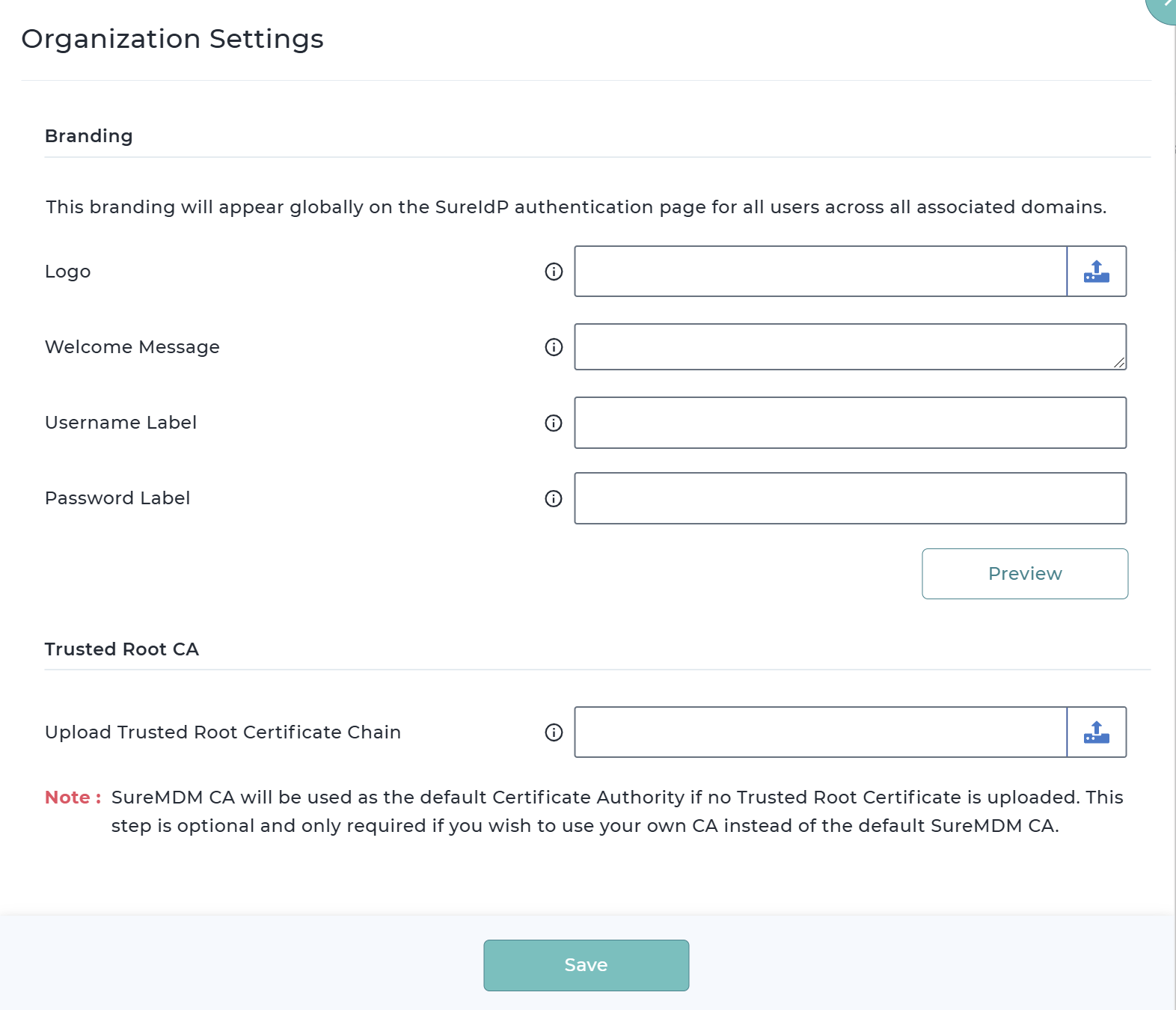
Organizational Settings
- Use this option to configure Branding and Certificate authority for SureIdP configuration:
Branding Configuration
This section allows you to customize the organization's branding. The configured branding will be applied globally to the SureIdP authentication page, visible to all users across all associated domains during their login experience.
Logo – Upload a logo to prominently display your organization's branding on the login screen. Max Dimensions: 300 x 300, Supported file types: .png, .jpeg, .jpg.
Welcome Message – Used to add a personalized welcome message for users, such as instructions or greetings.
Username Label – Used to add a personalized username label that users can relate to.
Password Label – Used to add a personalized password label that users can relate to.
Trusted Root CA Section:
This section allows you to upload your own Trusted Root Certificate Authority (CA), which will be used to validate user certificates during application authentication.
- Upload Trusted Root Certificate Chain – Upload a valid certificate chain file (.pem, .cer, .crt) to establish trust for validating issued user certificates
Note: SureMDM CA will be used as the default Certificate Authority if no Trusted Root Certificate is uploaded.
This step is optional and only required if you wish to use your own CA instead of the default SureMDM CA.
- After providing the required details, click Save.