Quick Look At The SureAsset Console
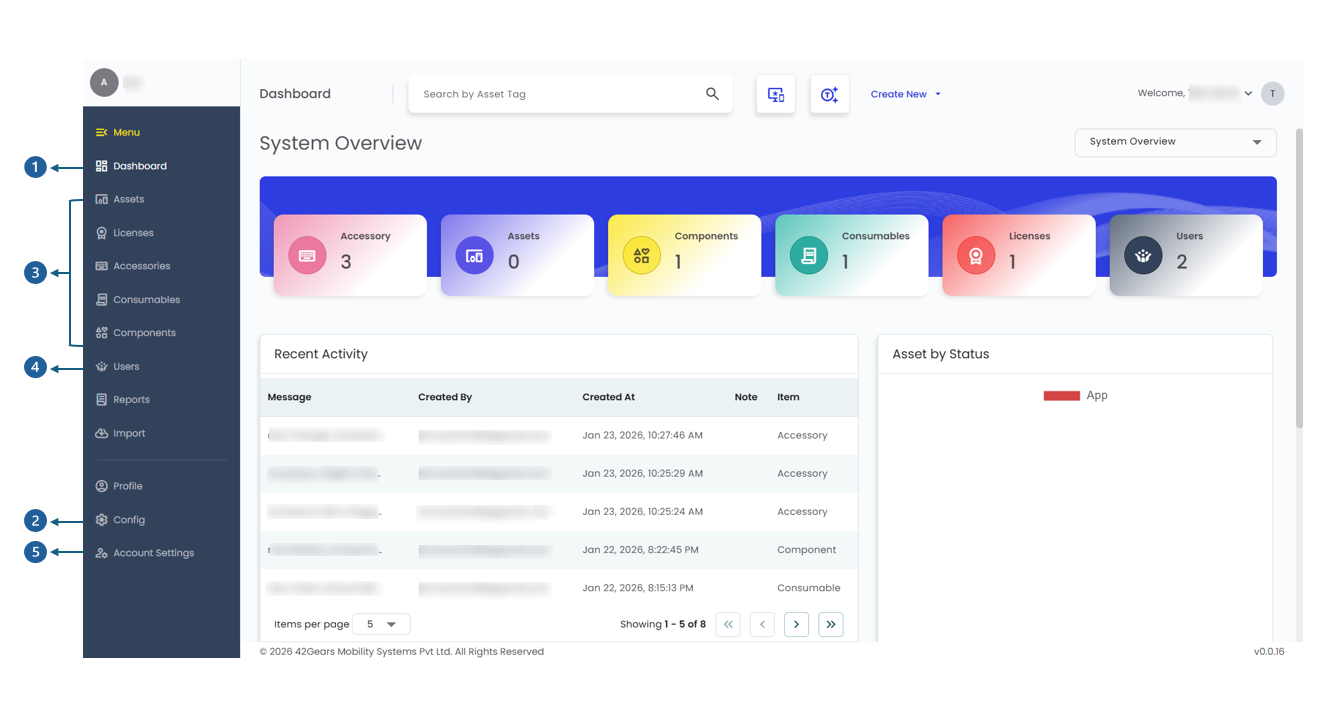
The system is divided into four primary functional areas: Insight, Configuration, Management, and Administration.
 |
|---|
The Dashboard serves as the operational home screen. It translates complex data into visual insights:
- View pre-filtered charts based on location, department, and category.
- Get instant counts of assets, licenses, and current status distribution.
- Use quick-links to add new assets/users or jump directly to specific listing pages.
2. Configuration (The "Config" Module)
The Config section is where you define the building blocks used in dropdown menus throughout SureAsset:
- Define Companies, Locations, and Departments.
- Set up Manufacturers, Asset Models (including EOL durations), and Suppliers.
- Create custom statuses (e.g., "In Repair," "Deployable") and Depreciation schedules for tracking.
- Tailor the data you capture by adding unique attributes like "Warranty ID".
SureAsset categorizes asset into five distinct types to ensure appropriate tracking for each:
- Assets: High-value hardware (Laptops, Servers) tracked by unique tags and serials.
- Licenses: Digital software subscriptions.
- Accessories: Supporting hardware (Keyboards, Chargers) managed by quantity.
- Consumables: Use-and-forget items (Toner, Paper) with low-stock alerts.
- Components: Internal parts (RAM) that are checked out to a parent asset.
This module defines user access and asset accountability across the system:
- Assign roles ranging from Standard User (view only) to Super User (full system control).
- Track employee IDs, department affiliations, and VIP status for priority handling.
5. Advanced Settings & Security
Located in Account Settings, this area allows for high-level customization:
- Apply your company logo and brand name to the interface.
- Configure Single Sign-On (SSO) and enforce strict Password Policies.
- Access Audit Logs and Activity Histories to ensure compliance and monitor system changes.
- Use the Import feature to onboard thousands of records at once via CSV, with the Auto-Create option to save time.