Roles
Overview
The Roles section under User Management allows SuperHub administrators to define and manage roles that control user access and permissions across the SuperHub Console. Default system roles such as Super Admin provide full access, while custom roles can be created to restrict or grant specific permissions based on operational requirements.
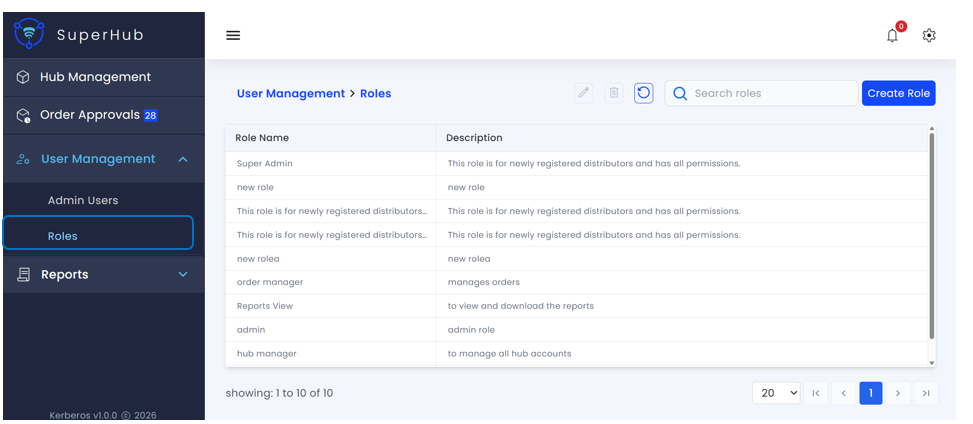
Roles List
The Roles screen displays a tabular list of all available roles along with their descriptions, enabling administrators to easily review and manage role definitions.
Key Actions
The following actions are available on the Roles page:
Create Role — Create a new role by defining a role name, description, and associated permissions. Newly created roles can be assigned to admin users to control their access within SuperHub
Edit Role — Modify an existing role. Any changes made will apply to all users currently assigned to that role
Delete Role — Remove a role from the system. A role can only be deleted if it is not currently assigned to any admin users, preventing accidental loss of access
Search Roles — Quickly locate roles by name using the search functionality
Refresh — Reload the list to fetch the latest roles
Pagination and Navigation — Control the number of records displayed per page (default: 20) and navigate using First, Previous, Next, and Last page options
Create Role
The Create Role dialog allows administrators to define a new role and configure the permissions associated with it. Roles control what actions users can perform within SuperHub.
Required Fields
The following information must be provided to create a role:
Role Name — Unique name of the role (mandatory)
Description — Brief explanation of the role's purpose and intended usage. This helps administrators understand the access level and purpose of the role (optional)
Permissions — Define the permissions granted to the role. Select the specific actions and access levels that users with this role will have (mandatory)
Actions
The following actions are available:
Create Role — Creates the role with the specified name, description, and selected permissions. This button remains disabled until all mandatory fields are completed
Close (✕) — Closes the Create Role dialog without saving any changes