Admin Users
Overview
The Admin Users page under User Management allows SuperHub administrators to view, create, and manage administrative users who have access to the SuperHub Console. These users are assigned specific roles that determine their permissions across Hub Management, Order Approvals, and Reports. This page provides centralized visibility into all admin-level users and supports secure access control and role-based administration.
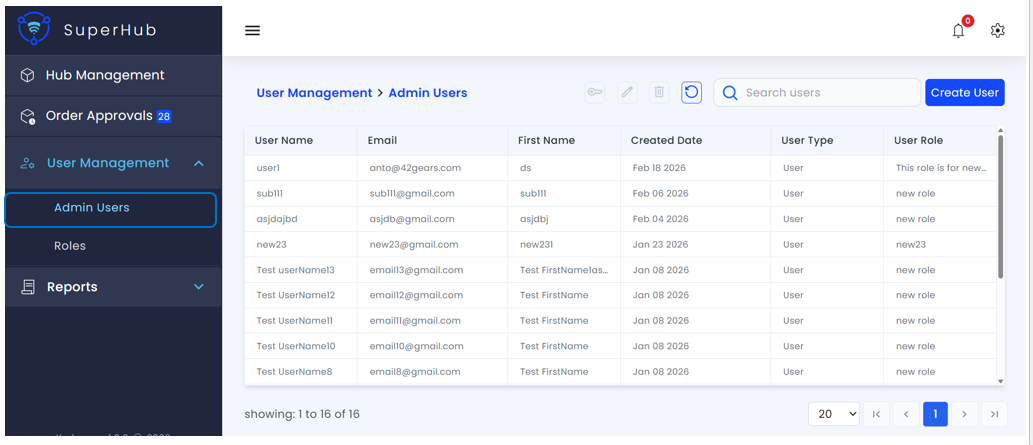
Admin Users List
The Admin Users page displays all users in a tabular format with the following columns:
User Name — Unique username of the admin user
Email — Registered email address of the user
First Name — First name of the user
Created Date — Date when the user account was created
User Type — Indicates the user category (e.g., Admin, User)
User Role — Role assigned to the user that defines permissions
Key Actions
The following actions are available on the Admin Users page:
Create User — Click Create User to open the user creation workflow and add a new admin user
Edit — Update user details when needed. Click the Edit icon for the desired user to modify their information
Delete — Remove users when necessary. This action permanently deletes the user account and should be performed with caution
Reset Password — Reset an admin user's password by entering and confirming a new password. The new password must meet security requirements
Search Users — Search for users using the search bar based on User Name, Email, or First Name
Refresh — Reload the list to fetch the latest user data
Pagination and Navigation — Control the number of records displayed per page (default: 20) and navigate using First, Previous, Next, and Last page options
Create User
The Create User dialog allows SuperHub administrators to add new admin users to the system and assign appropriate access roles.
Required Fields
The following information must be provided to create a user:
User Name — Unique identifier for the admin user (mandatory)
Password — Password for the admin user account that meets the minimum security requirements (mandatory)
Confirm Password — Re-enter the password to ensure accuracy. Must exactly match the Password field (mandatory)
First Name — First name of the admin user (mandatory)
Last Name — Last name of the admin user (optional)
Email — Email address associated with the admin user (mandatory)
Phone Number — Contact number of the admin user (optional)
Role — Role to be assigned to the admin user (mandatory). The role determines the permissions and access level within SuperHub. Once selected, the user inherits the permissions defined for that role
Actions
The following actions are available:
Create User — Click this button to create the user after entering all mandatory fields. Upon successful creation, the user will appear in the Admin Users list
Close (X) — Closes the Create User dialog without saving any changes