Profile Configuration
The profile must be configured for Shared Device Mode (SDM) to ensure it is applied to the device in both logged-in and logged-out states.
For Microsoft Entra, the configuration of the profile varies based on the Enable Single Sign-On (SSO) option available under the Authentication section.
Profile Configuration if Microsoft Entra selected as Identity Provider
Profile to be applied when SDM is enabled / user logs out
If SSO is enabled
Prerequisites for Shared Device Mode with Microsoft Entra ID SSO
Before configuring the profile for Shared Device Mode with Microsoft Entra ID (formerly Azure AD) as the Identity Provider and SSO enabled, ensure that the Microsoft Authenticator application is installed on the target device.
Once Shared Device Mode is enabled on the device, the end user must first launch the Microsoft Authenticator application and proceed with login through the SureMDM Agent.
Launching the Authenticator application initially is mandatory because the app is responsible for establishing the shared device session, registering the device with Microsoft Entra ID, and enabling the necessary SSO tokens required for authentication.
Payload Configuration
When Single Sign-On (SSO) is enabled, the following payloads must be mandatorily configured on the profile which is selected under the Default Profile for Shared Device Mode, in addition to any other payloads required as per your configuration.
- Extensible Single Sign-On
- Application Configuration
- Allowed / Blocked Applications
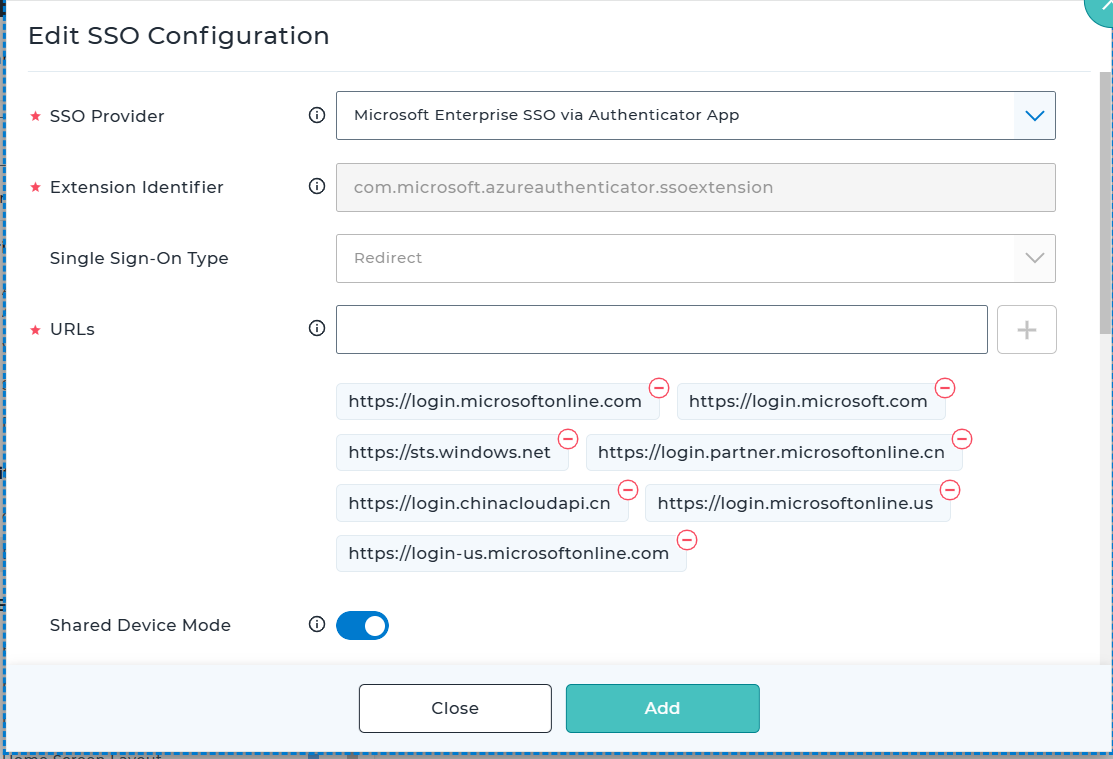
Extensible Single Sign On Configuration
| Settings | Description |
|---|---|
| SSO Provider | Choose the identity provider as Microsoft Enterprise SSO via Company Portal App. |
| Extension Identifier | Below value will be auto populated based on the SSO Provider. com.microsoft.azureauthenticator.ssoextension |
| Single Sign-On Type | Below value will be auto populated based on the SSO Provider. Redirect |
| URLs | An array of URL prefixes of identity providers where the app extension performs SSO. Below values will be auto-populated if SSO Provider is selected as Microsoft Enterprise SSO via Company Portal App |
| Shared Device Mode | This option should be enabled. |
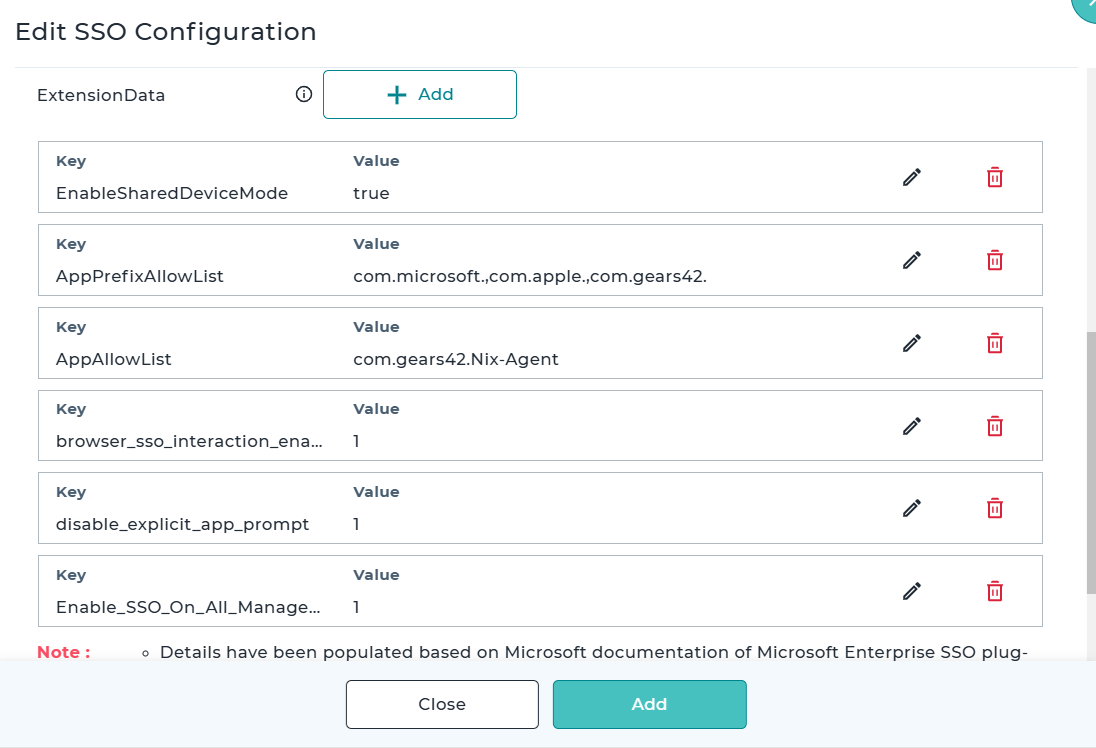
| ExtensionData | Include the below Extension Data items EnableSharedDeviceMode → true AppPrefixAllowList → com.microsoft.,com.apple.,com.gears42. AppAllowList → com.gears42.Nix-Agent browser_sso_interaction_enabled → 1 disable_explicit_app_prompt → 1 Enable_SSO_On_All_ManagedApps → 1 |
Application Configuration Configuration
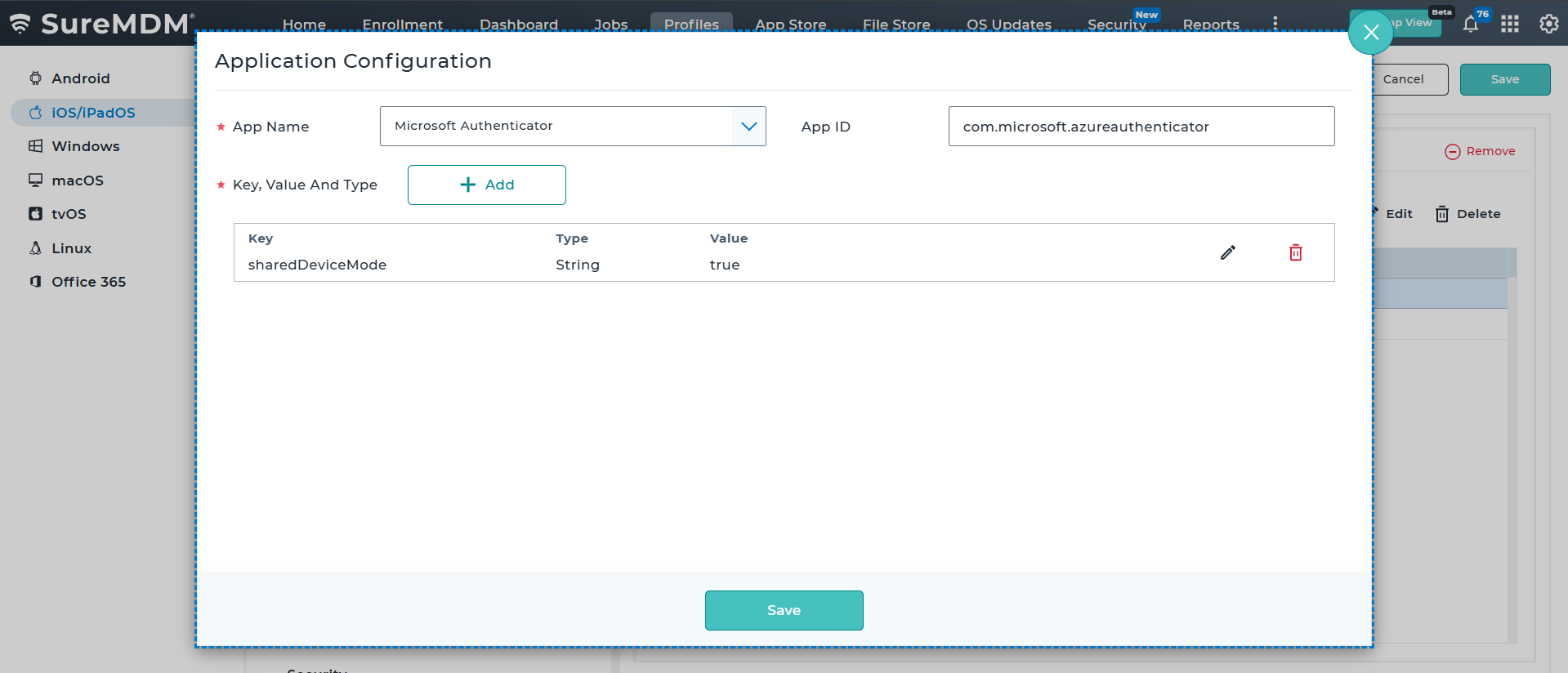
Include Microsoft Authenticator app in the Application Configuration payload with below key
| Key | Type | Value |
|---|---|---|
| sharedDeviceMode | String | true |
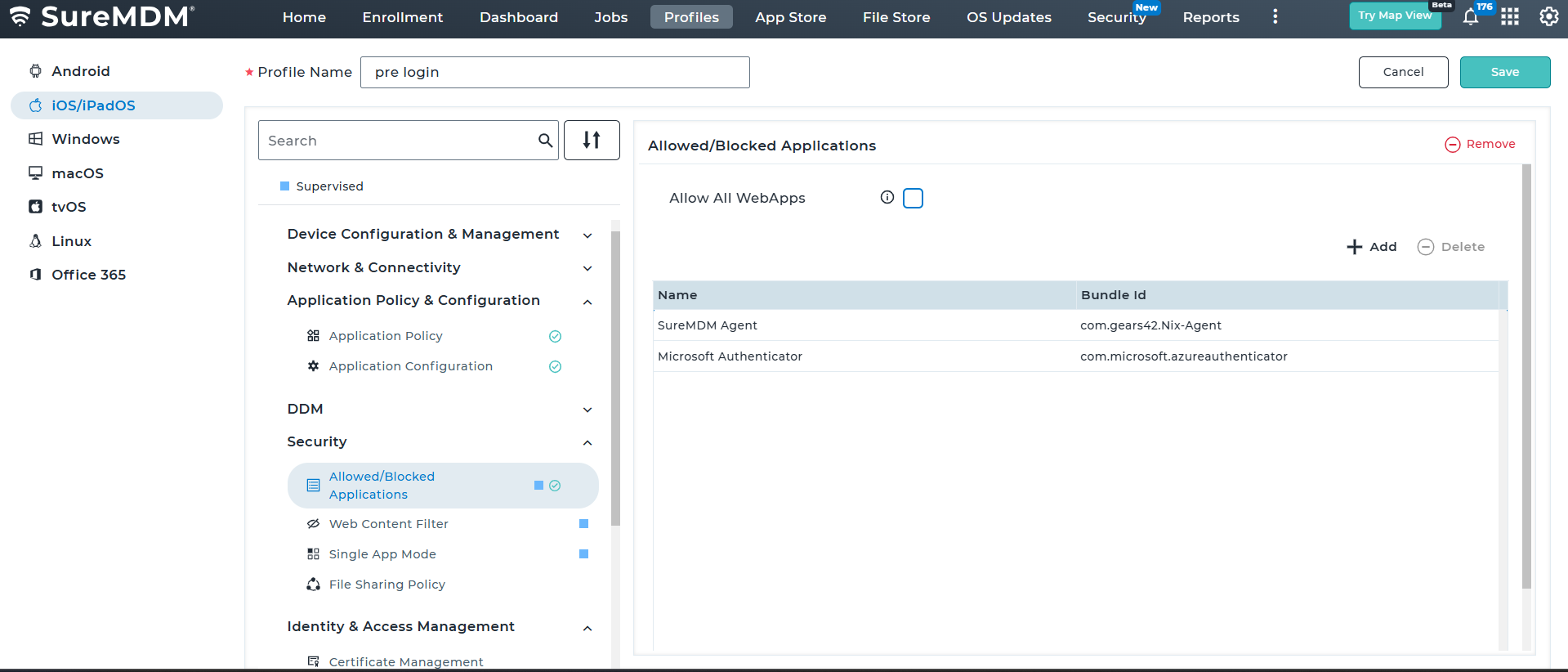
Allowed / Blocked Applications Configuration
Include the below applications in this payload
- Microsoft Authenticator
- SureMDM Agent
If SSO is not enabled
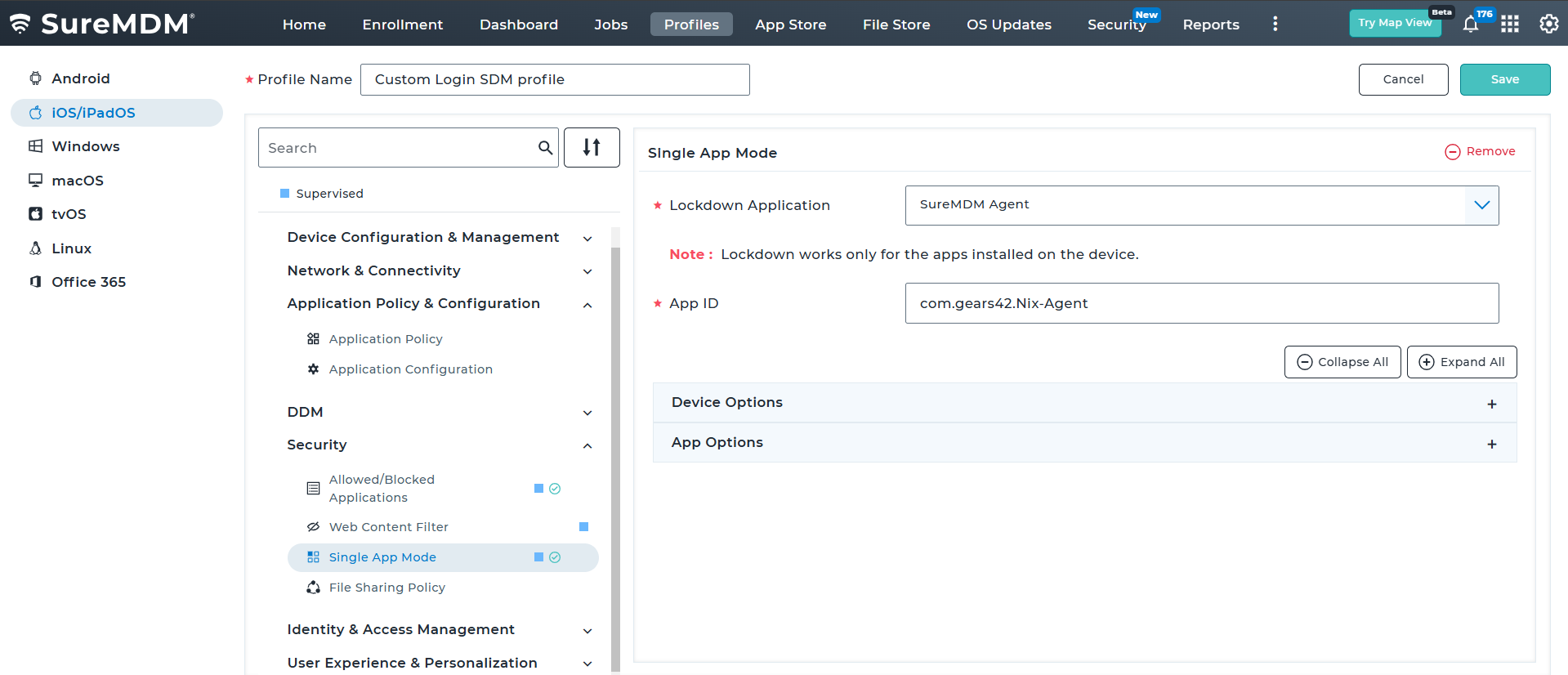
When Single Sign-On (SSO) is disabled, the following payload must be mandatorily configured on the profile which is selected under the Default Profile for Shared Device Mode section if the admin opts for Custom Profile, in addition to any other payloads required as per your configuration.
- Single App Mode
Single App Mode Configuration
Include the SureMDM Agent application in the Single App Mode payload to configure the device in kiosk mode with the agent as the active application.
Profile to be applied when the user logs in
If SSO is enabled
When Single Sign-On (SSO) is enabled, the following payloads must be mandatorily configured on the profile which is selected under the Profile Assignment based on Device and User Properties section, in addition to any other payloads required as per your configuration.
- Extensible Single Sign-On
- Allowed / Blocked Applications Configuration
Extensible Single Sign On Configuration
| Settings | Description |
|---|---|
| SSO Provider | Choose the identity provider as Microsoft Enterprise SSO via Company Portal App. |
| Extension Identifier | Below value will be auto populated based on the SSO Provider. com.microsoft.azureauthenticator.ssoextension |
| Single Sign-On Type | Below value will be auto populated based on the SSO Provider. Redirect |
| URLs | An array of URL prefixes of identity providers where the app extension performs SSO. Below values will be auto-populated if SSO Provider is selected as Microsoft Enterprise SSO via Company Portal App |
| Shared Device Mode | This option should be enabled. |
| ExtensionData | Include the below Extension Data items EnableSharedDeviceMode → true AppPrefixAllowList → com.microsoft.,com.apple.,com.gears42. AppAllowList → com.gears42.Nix-Agent browser_sso_interaction_enabled → 1 disable_explicit_app_prompt → 1 Enable_SSO_On_All_ManagedApps → 1 |
Allowed / Blocked Applications Configuration
Include the below applications in this payload
- Microsoft Authenticator
- SureMDM Agent
If SSO is not enabled
When Single Sign-On (SSO) is not enabled, select the desired iOS profile under the Profile Assignment Based on Device and User Properties section. Ensure that the selected profile contains all the required payloads based on your configuration as this profile will be applied once the end-user successfully logs into the device.
Profile Configuration if SureIdP as Identity Provider
Profile to be applied when SDM is enabled / user logs out
Custom Profile
The following payload must be mandatorily configured on the profile which is selected under the Default Profile for Shared Device Mode section if the admin opts for Custom Profile, in addition to any other payloads required as per your configuration.
- Single App Mode
Single App Mode Configuration
Include the SureMDM Agent application in the Single App Mode payload to configure the device in kiosk mode with the agent as the active application.
Profile to be applied when the user logs in
Select the desired iOS profile under the Profile Assignment Based on Device and User Properties section. Ensure that the selected profile contains all the required payloads based on your configuration as this profile will be applied once the end-user successfully logs into the device.