Re-signing iOS Agent Using XReSign Tool
The iOS Agent application must be re-signed using the development certificate and provisioning profile.
Step 1: Download Required Files
Download the iOS Agent .ipa file (WebDriverAgentRunner-Runner.ipa).
Download the XReSign tool:
https://mars.astrouploads.com/support/inout/astrofarm/resign-tool/xresign.pkg
Step 2: Install and Launch XReSign*
- Install the XReSign package.
- Open the GUI application of XReSign.
Step 3: Perform Re-signing*
- Drag or browse the WebDriverAgentRunner-Runner.ipa file into the top field.
- Drag or browse the downloaded .mobileprovision file into the second field.
- Select the appropriate Apple Development certificate from Keychain Access in the bottom field.
- Click Resign.
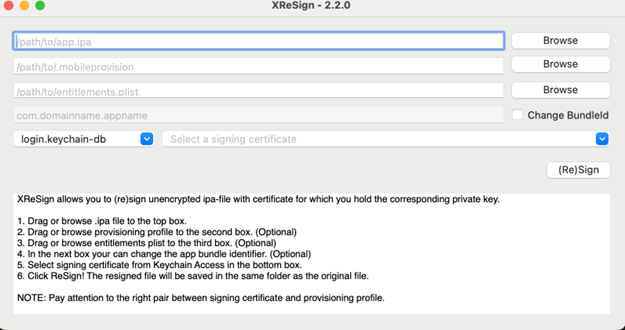
The re-signed file will be generated in the same directory as the original IPA file.
Step 4: Upload Re-signed IPA*
- Navigate to the AstroFarm Console → Settings (on the left side bar) → iOS Agent.
- Click the Add button on the top right corner.
- Enter Title and upload the resigned ipa file.