SureAccess Architecture and Flow
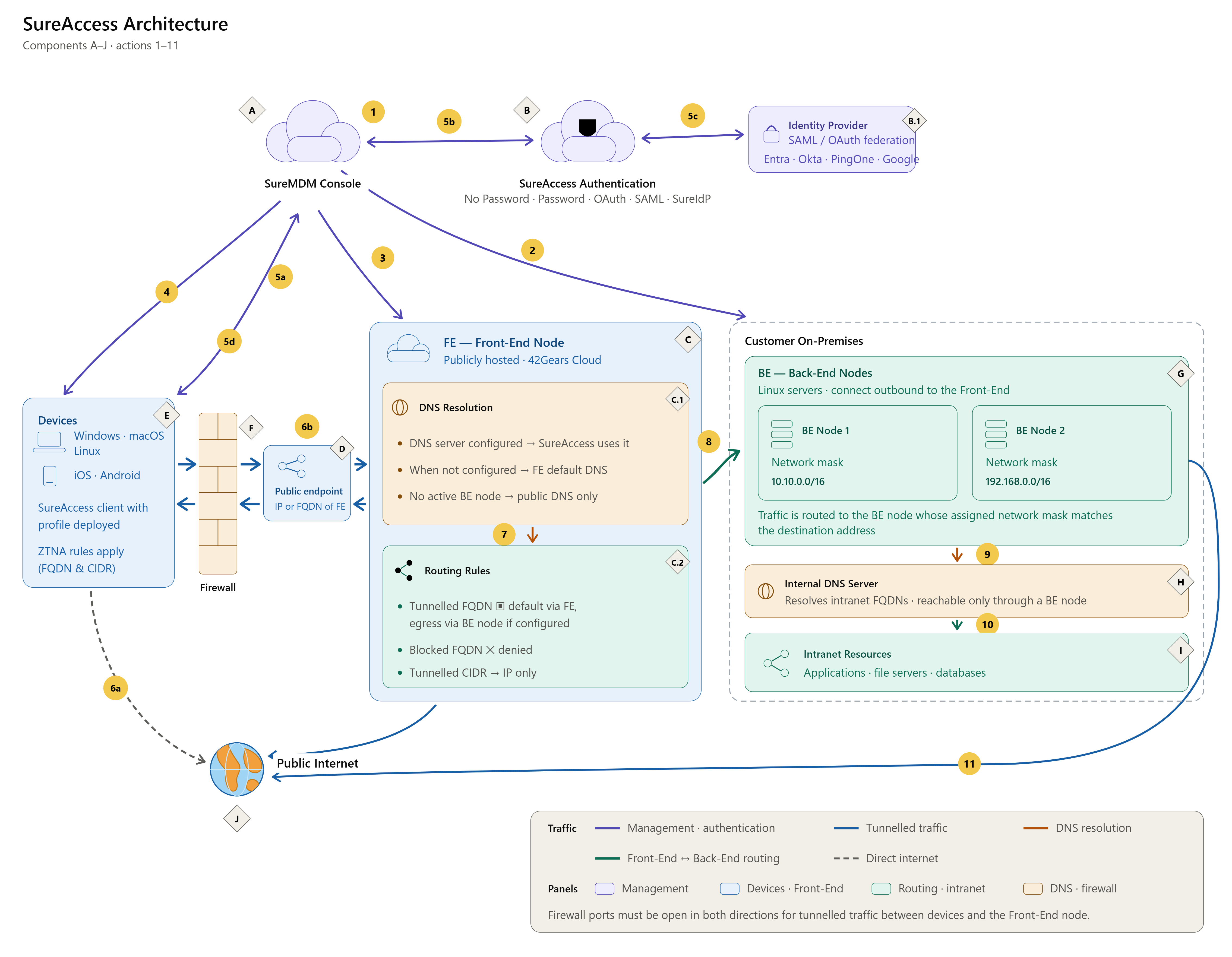
Components
- A – SureMDM Console: The administration console where SureAccess is enabled and configured.
- B – SureAccess Authentication: Authenticates the user before a tunnel is established. Supported authentication types include No Password, Password, OAuth, SAML, and SureIdP.
- B.1 – Identity Provider: An external SAML or OAuth provider used when federated authentication is configured. Supported providers include Microsoft Entra, Okta, PingOne, OneLogin, Google Workspace, and SureIDP.
- C – FE (Front-End Node): Publicly hosted in the 42Gears Cloud, it enforces the configured ZTNA policies, handles DNS resolution, and determines the appropriate route for traffic based on the SureAccess configuration.
- C.1 – DNS Resolution: When a DNS server is specified in the DNS configuration, the FE node uses it for DNS lookups; otherwise, it uses its default DNS service provider. If no Back-End node is active, only publicly accessible DNS servers can be configured.
- C.2 – Routing Rules: Applies the rules configured in the profile. Tunnelled FQDNs exit through the Front-End node by default, or through a Back-End node when an egress gateway is configured for that FQDN or when it is an intranet endpoint. Blocked FQDNs are denied. Tunnelled CIDR ranges are reachable only by IP address, with no DNS resolution.
- D – Public Endpoint: The public IP address or FQDN of the Front-End Node.
- E – Devices: Endpoints running the SureAccess client with a profile deployed. Supported platforms include Windows, macOS, Linux, iOS, and Android. ZTNA rules for FQDNs and CIDR ranges are applied on the device.
- F – Firewall: Sits between devices and the Front-End Node. The relevant ports must be open in both directions for tunnelled traffic.
- G – BE (Back-End Nodes): Customer-hosted Linux server(s) within the corporate network. Each node has an assigned network mask that determines which destinations it serves.
- H – Internal DNS Server: A customer-hosted DNS server used for intranet resolution and reachable only through a Back-End node.
- I – Intranet Resources: Internal applications, file servers, and databases within the corporate network.
- J – Public Internet: Traffic evaluated via ZTNA and routed to the appropriate internet destination.
Process & Operational Actions
- The administrator enables SureAccess and configures it in the SureMDM Console.
- If access to intranet resources is required, the administrator installs one or more Back-End nodes on Linux machines within the corporate network. Each Back-End node maintains a connection with the SureMDM Console to register itself, receive its configuration, and is assigned a network mask.
- The SureMDM Console syncs the configuration to the Front-End Node.
- The administrator deploys the SureAccess profile to devices according to the device platform.
- The device authenticates before any tunnel is established:
- The device sends its authentication request to the SureMDM Console.
- The console passes the request to SureAccess Authentication, which applies the configured authentication type.
- Where OAuth or SAML is configured, the request is evaluated with the external identity provider.
- Once authentication succeeds, the SureMDM Console confirms the result to the device and the tunnel is established.
- ZTNA rules determine how traffic is handled:
- Traffic that does not match a tunnelled FQDN or CIDR rule is directly routed to the internet bypassing the tunnel.
- Traffic matching a tunnelled FQDN or CIDR rule is routed through SureAccess. It passes through the firewall to the Front-End Node's public endpoint, which requires the relevant ports to be open.
- The Front-End Node resolves domain names for tunnelled resources using the configured DNS server, or its default public DNS if none is specified. DNS resolution is skipped for tunnelled CIDR entries.
- Traffic destined for intranet resources is routed to the Back-End Node. The node is selected by matching the destination address against each node's assigned network mask. An FQDN configured with a specific Back-End node as its egress gateway is routed explicitly through that node.
- Internal hostnames are resolved by the customer's internal DNS server through the selected Back-End node.
- Traffic reaches the intranet resource through the Back-End node.
- Tunnelled traffic with a Back-End node configured as its egress gateway is routed explicitly to the internet through that node, appearing to originate from inside the customer network (applies to resources hosted on the internet where access is restricted to the BE node).
Key Considerations
- Where no Back-End node is configured and active, only publicly accessible DNS servers are permitted, and private CIDR ranges (10.0.0.0/8, 172.16.0.0/12, 192.168.0.0/16) cannot be added.
- Blocked FQDNs are denied at the Front-End Node and do not egress to any destination.
- Tunnelled CIDR entries are reached over IP only. No DNS resolution is performed for these IP ranges.
- Configuration made in the console takes effect on devices only after the SureAccess profile is deployed to them.
- Where multiple Back-End nodes are deployed, the assigned network mask determines which node serves a given destination.