Using Gmail Account
Take a new device or factory reset the existing device.
On the Language page, select the desired Language and tap Start.
Connect the device with Wi-Fi network.
Next, on Add your account screen, enter Email as afw#sureMDM and tap Next.
Next, go through Google services and Accept to go to the next screen.
On the SureMDM Agent, select Fully Managed Device.
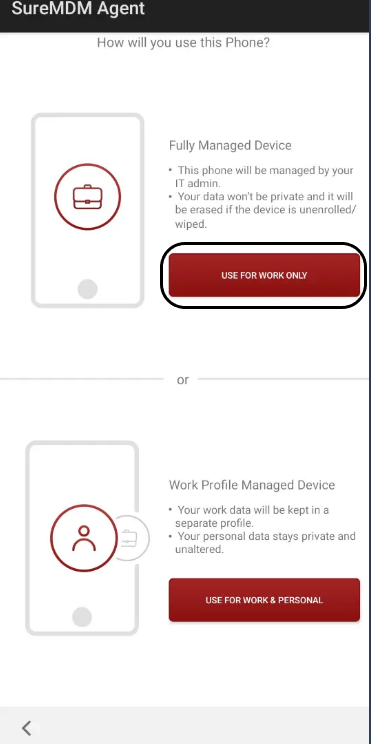
This screen will be visible only on Android 12 and above devices.
The device will get enrolled directly as Device Owner for devices running below Android 12.
On the Android for Work screen, SureMDM Agent will be listed, tap Install.
SureMDM Agent will start downloading.
On the Android Enterprise Configuration, select Skip Encryption and tap Next.
On the Set up your profile screen, tap Set Up.
The device will be enrolled into fully managed mode with the SureMDM Agent application